What a driver actually needs
Before comparing tools, it helps to agree what a driver needs from the office each day:
- The stops, in order, with full addresses.
- The time or window for each one.
- Job notes: the gate code, the dog, the part to bring, the customer who wants a call first.
- A way to navigate without retyping addresses.
- Changes as they happen: cancellations, new urgent jobs, moved appointments.
And the office needs something back: where each driver is in the day, and which jobs are done.
Option 1: Printed route sheets
The classic. The office prints each driver's day, and they take it with them.
Good for: simple days that rarely change, and drivers who prefer paper.
Weak spots: it's out of date as soon as anything changes. Every address has to be typed into a map app by hand. Notes get scribbled in the margin and lost. The office can't see progress without phoning.
Option 2: Group texts and map links
Many teams move from paper to messages: the day's list in a text or chat app, often with a map link for each stop.
Good for: quick changes and small teams.
Weak spots: information gets scattered across a long thread. It's easy to miss a message while driving, and the order of stops lives in someone's head. Each change means another message, and there's no single, up-to-date view of the day.
Option 3: A driver app
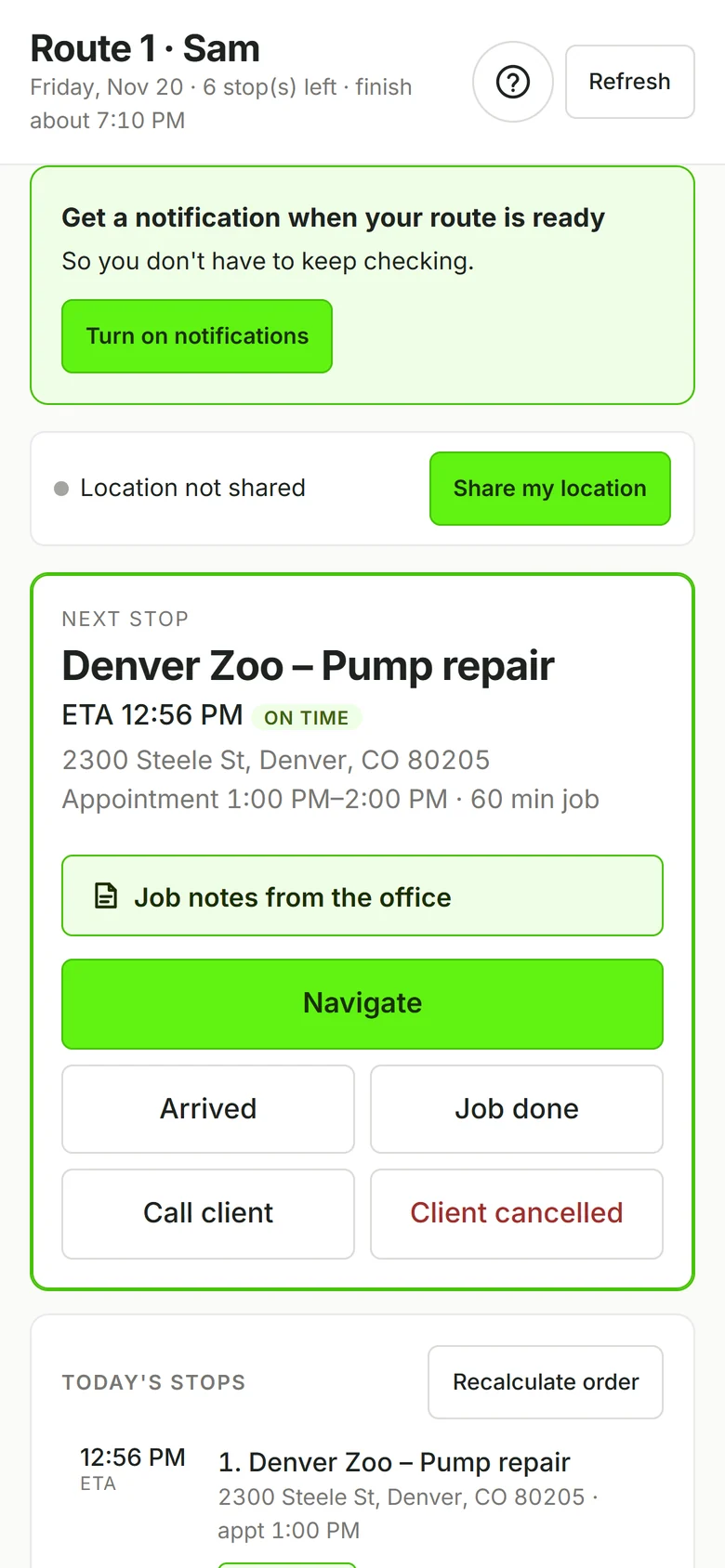
A driver app shows each driver their own day on their phone, already in order, with notes and one-tap navigation, and updates when the office changes the plan.
Good for: teams with several vehicles, timed appointments and days that change.
Weak spots: drivers need to install it and get used to it, and some apps need a strong signal or an app store account. Choose one that is quick to set up and works where your drivers go.
How the RouteWise driver app works
This is how we approached it, so you can compare it with whatever you are looking at:
- Pairing: each phone pairs to the office by scanning a QR code. No accounts for drivers to remember.
- Installing: the driver app installs from the phone's browser to the home screen, on Android and iPhone. No app store needed.
- Sending: the office presses "Send to drivers" and each person gets their own stops in order, with job notes from the office.
- Navigating: one tap opens the next stop in Google Maps.
- During the day: arrivals and finished jobs are picked up automatically, and the driver can mark a client as cancelled or add a stop. The rest of the day is worked out again.
- Weak signal: it keeps working when the signal is poor.
Questions to ask before you switch
Whichever app you look at, ask:
- How long does it take to get a new driver set up?
- Does it need an app store account or a company phone?
- What happens with a weak signal or no signal?
- Can the driver handle a cancellation or a new stop without phoning the office?
- Can the office see progress without calling?
Bringing drivers along
Drivers sometimes worry that an app means being watched, or that the office will plan routes that ignore what they know about the area. Be open about what the office sees and why: mostly so customers can be told when someone is on the way, and so nobody has to ring round to ask. Ask drivers which local knowledge should shape the plan, such as a road to avoid at school time. Our article on arrival windows explains why that shared view matters to customers.
Questions and answers
What is the best way to send routes to drivers?
For teams with more than one or two vehicles, a driver app is usually best: each driver sees their own stops in order, with notes and navigation, and the plan updates when things change. Printed sheets and texts work for simple days that rarely change.
Do drivers need to download an app from the app store?
Not always. The RouteWise driver app installs from the phone's browser to the home screen on Android and iPhone, and pairs to the office by scanning a QR code, so no app store account is needed.
Can drivers navigate from a route planning app?
Most driver apps link to a navigation app. In RouteWise, one tap opens the next stop in Google Maps, so drivers never retype addresses.
What happens if a driver loses signal?
It depends on the app. Check before you choose. The RouteWise driver app is built to keep working with a weak signal, so drivers can still see their day.
How do I get drivers to use a new route app?
Start with one willing driver, keep the setup quick, and be open about what the office can see and why. Ask drivers for local knowledge that should shape the plans, so the app feels like it works with them.